Clinical hours tracking
Pre-licensed clinicians accumulate thousands of supervised hours on the road to licensure — and every licensing board wants them documented. The Clinical Hours page tracks them automatically where it can and makes the rest one click.
In this guide, we'll cover:
The three buckets
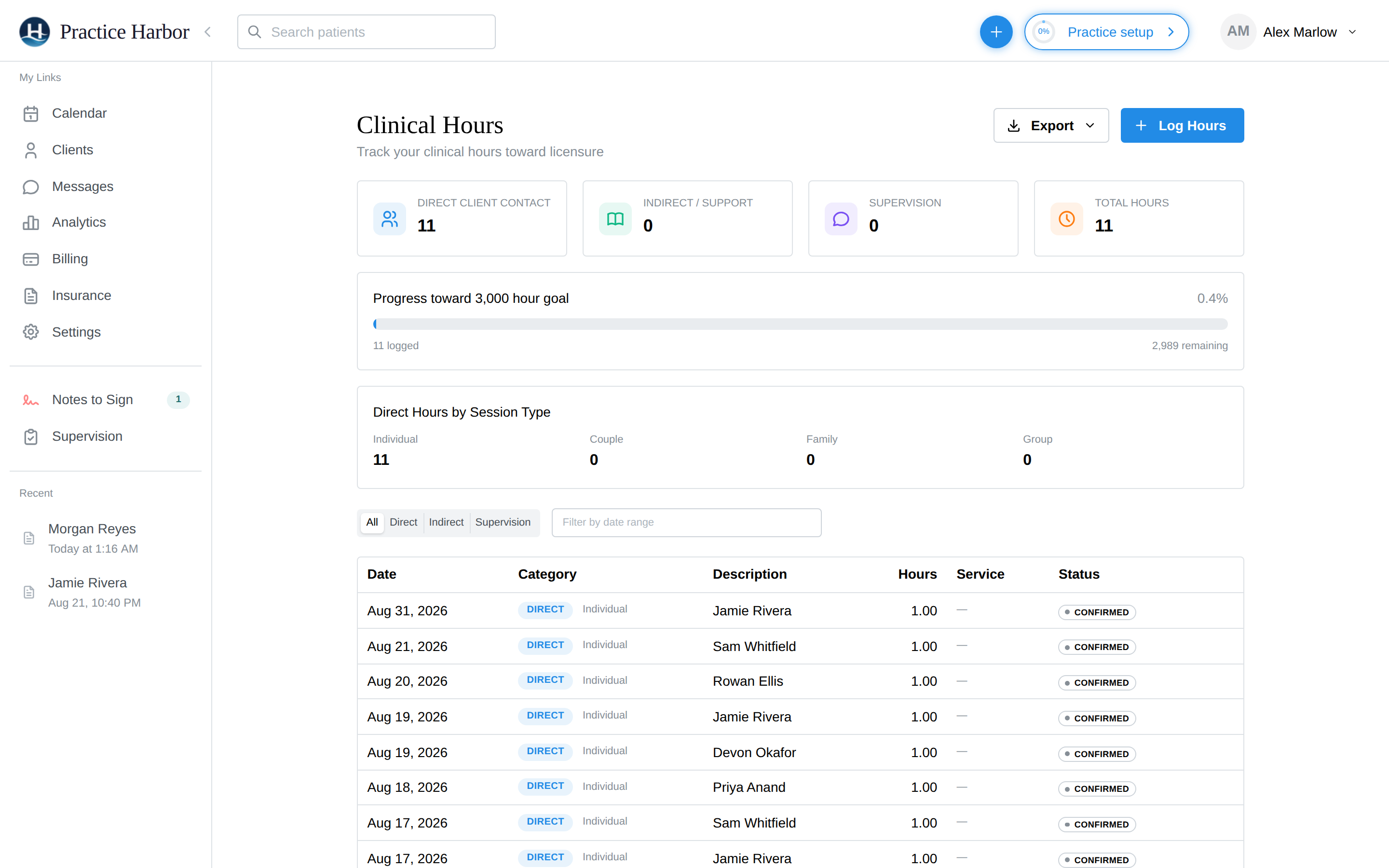
- Direct client contact — session time with clients. Completed appointments log here automatically — run your sessions on the calendar and this bucket fills itself
- Indirect / support — documentation, treatment planning, trainings, and other non-contact clinical work; logged manually
- Supervision — time in supervision; logged manually
The progress bar tracks your total against the hour goal (e.g., 3,000 hours), so you always know how far along you are.
Logging hours manually
- Click Log Hours
- Choose Indirect or Supervision, pick the activity type, and enter the date and duration
- Save — the totals and progress update immediately
Use the All / Direct / Indirect / Supervision filters and the date-range filter to review any slice of your log.
Exporting for your board
Click Export to produce your hours log for licensure paperwork or a supervisor's signature. Export regularly — your future licensed self will thank you.