Subscription & Pricing
Practice Harbor uses a credential-based sliding scale — your price is determined automatically by your professional credentials, not by feature tiers. Every practitioner gets access to all features. No one is locked out of tools they need.
How Pricing Works
Your tier is determined by two things: your credentials (license + NPI) and whether your practice has multiple clinicians.
| Tier | Price | Who Qualifies |
|---|---|---|
| Pre-Licensed | Free | Pre-licensed clinicians (LMSW, LPC-A, MFT intern, etc.) or practitioners without credentials on file |
| Licensed | $19/month | A fully licensed clinician with an NPI number, practicing solo |
| Established | $39/month base + $19/month per additional licensed clinician | Practices with 2 or more clinicians of any tier (including pre-licensed). The $39 base includes the owner's licensed seat |
Pre-licensed clinicians and trainees are always free — no credit card required, no trial period, full access to every feature. This includes associate-level licenses like LMSW, ASW, LAPC, LPC-A, MFT, and psychology interns/postdocs.
What Determines Your Tier
Your tier is assessed automatically from the credentials in your Settings > Profile > Clinical Information:
- License type — if your license is a pre-licensed designation (e.g., LMSW, LPC-A, MFT intern), you're on the free Pre-Licensed tier
- NPI number — having both a license and NPI indicates you're independently licensed
- Team size — once your practice has 2 or more clinicians of any tier (including pre-licensed), the Established tier applies
Supervision status does not affect your tier. A licensed clinician under supervision still qualifies for the Licensed tier ($19/month), not the free Pre-Licensed tier.
Worked Examples
- Solo licensed clinician — $19/month
- 1 licensed supervisor + 6 pre-licensed associates — $39/month (the base includes the supervisor's seat; associates are free)
- 1 licensed owner + 3 additional licensed clinicians + 2 pre-licensed associates — $96/month ($39 base + 3 additional licensed seats at $19 each)
Additional licensed seats are added by our team — just reply to any of our emails.
All Features, Every Tier
Unlike other EHRs, Practice Harbor does not gate features behind pricing tiers. Every practitioner — free or paid — gets:
- Unlimited clients
- AI-powered progress notes
- Telehealth (video sessions)
- Client portal
- Scheduling & reminders
- Online booking
- Billing & superbills
- Intake forms
- Secure messaging
- Treatment plans
- Google Calendar sync
- Data export
- EHR import
- Group therapy (couples/family)
- Team members & roles
- Supervision workflow
AI session notes are included. Ask Cora AI (the chart question box) includes a daily allowance per clinician that resets at midnight in your timezone.
Managing Your Subscription
To view or change your subscription:
- Go to Settings > Subscription
- Your current tier and billing status are displayed at the top
- For paid tiers, you can update your payment method or cancel
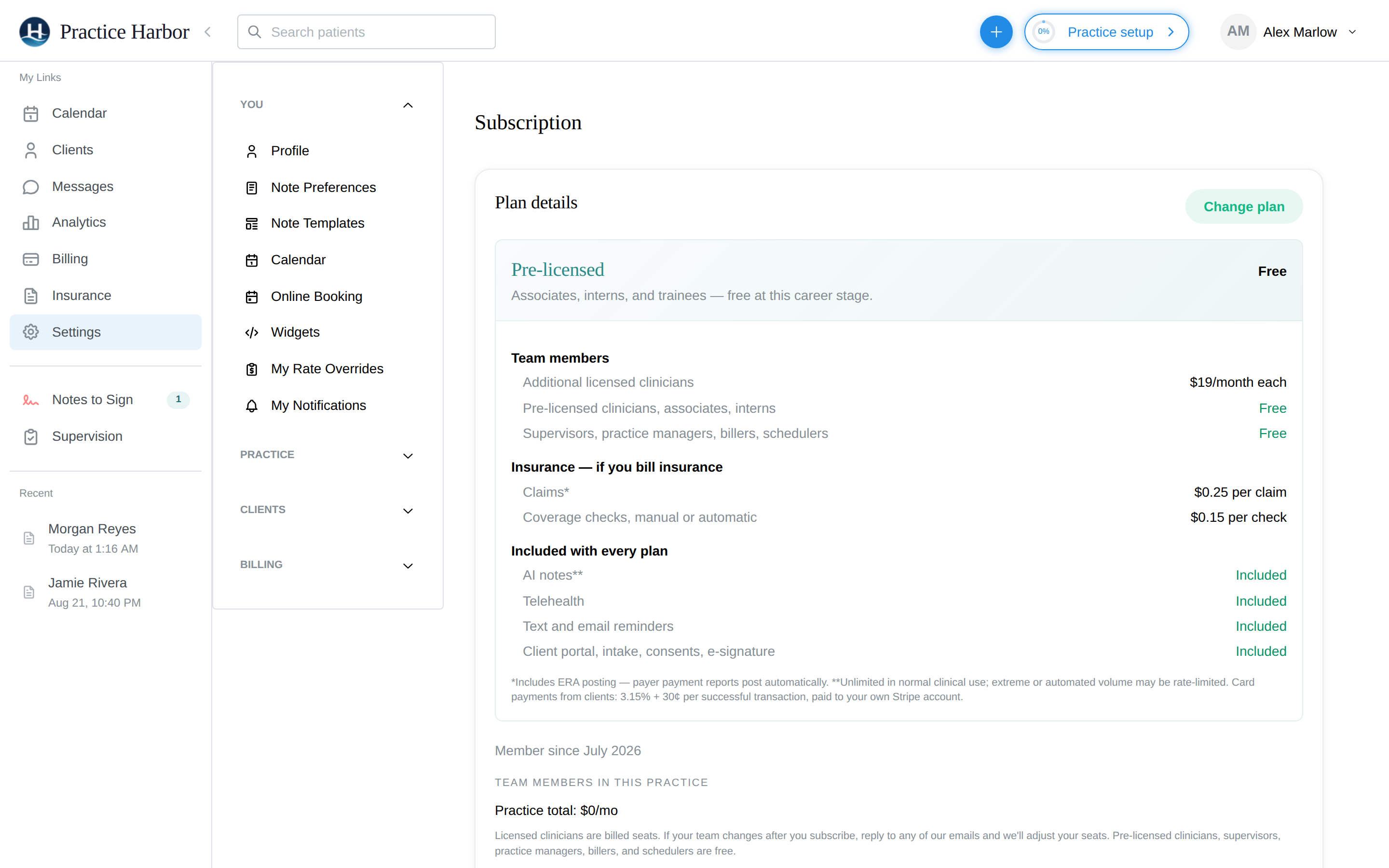
Tier changes happen automatically when your credentials change. For example, if you add your NPI number after getting licensed, your tier updates from Pre-Licensed to Licensed on your next billing cycle.
Does anything stop working if a payment fails or my subscription lapses? No. Online booking, your availability, the client portal, notes, and billing all keep working. We retry the card, you'll see a "Payment failed" notice on Settings → Subscription with an Update payment method button, and that's it — your access continues while it's sorted out.
Insurance usage prices
If you bill insurance, two things are priced per use:
| Price | |
|---|---|
| Electronic claim (ERA posting included) | 25¢ per claim |
| Coverage (eligibility) check — manual or automatic | 15¢ per check |
That's the whole list. There are no monthly claim fees, no clearinghouse subscription, and ERA posting doesn't cost extra. Charges appear as line items on your monthly bill, and the Upcoming bill view on Settings → Subscription shows the running count before anything is charged. Automatic coverage re-checks are off until you turn them on (Settings → Billing → Insurance & Superbills), and the setting shows an estimated monthly cost before you enable it.
Referral Program
Refer a colleague and both of you earn 2 free months when they make their second payment.
- Find your referral link in the app
- Share it with a colleague
- When they sign up and make their second payment, both accounts are credited
Related
- Profile settings (where credentials are managed)
- Recording a session